More progress of the Ni No Kuni sketch. Inked with Copic multiliner brown .01 and .03

It has gotten to the point like work as a Graphic Designer, I have to either a notepad or sticky note to keep up and remember artwork I need to do and complete. My short term memory of what is in my sketchbook suffers. Once I actually focus I'm pretty quick in drawing and execution. Like my mentor says try to not work on something too long or you can overwork it and waste time as well.


A drawing I did last year around this time. I like to look at milestones in work improvement.
I used to hate inking, but I enjoy it now. My lines are juicer and smoother.
And awareness of line sensitivity and spacial depth. Bolder lines to the front and thiner lines in the back.

Beautiful part of this stage I can totally mess up and try again.
I can use a scan and re-print the drawing. 


Inktober is coming up next week. This year I hope to keep up with the daily challenges daily, instead of starting mid-month and finishing later.


This next weekend 

Friday 13th and Saturday 14th the Paseo 2019 

light show event is happening in Taos, NM.


I've made people hyped about this event...
All of my friends I took last year were telling me for this year's event told me, "Yeah um if there is anything actually interesting going on call me... If not don't bother."
In the last few years the event hasn't been as good. Last year's concept was too abstract for people to grasp, the idea of inner and outer space was not conveyed well. I was disappointed there wasn't any outer space related installations besides the boring Earth globe one. On multiple occasions I apologized this was not so entertaining. Hopefully this year will be better. The fun starts when it gets dark.

Even if I go by myself to these kinds of things, I usually run into someone I know. No feelings hurt.


The most awesome thing was this random dance party that started late in the night. It reminded me of the Psychological Thriller Ex Machina, with all the creepy noises and suspense and all of a sudden happy happy dance time music pops up with lights.


Ex Machina is a good movie if you want your mind messed around with.                                       


          ________________________________________________________________________


I like to go all the days the event is hosted, there is something I always miss. Going on this Saturday the 14th as well is TCC which is a relatively new organization is having a fundraiser to help pay for their new building.

Normally at work I don't really look or read people's documents or pictures, unless something really catches my eye. We see so much stuff that it doesn't matter.  I ended up reading this while waiting for the test copy to print and the lady from the organization was flattered it caught my attention. You really can't beat a handmade mug for $20 and the drink included that also helps for a good cause. 😊👍
The downside is that this is going on during the Paseo, but hopefully a lot of people will drop by before the light show.


Last week I was invited to go last minute to go to this one day art show. I had nothing planned that evening or anything to do and I've been meaning to go out and look at art.


I'm glad I went even though I was exhausted. I almost missed the show completely because I took this epic nap. By the time I got there, it was the last half hour of the show. Wish I could of looked at everything longer.

There is a special connection when you look at live art that art you just vibe with. Soak up that magnificent energy and hopefully be able to channel that experience into your own work, if that makes any sense. It was weird there were a few paintings, that didn't look all that great or impressive close up but seeing it from across the room it was different, more vibrant. I forgot to take pictures of those paintings, they played with the eyes in a wonderful way.


 Months ago there was this night time skyscape I saw outside this gallery window, and I had no idea who the artist was. When I went to the show I was able to see similar work and determine the artist was Don Ward, who've I've been acquainted through the drawing group and was also a student of my late mentor Ray.

Looking at other's art you can learn things. Another thing I was impressed with was atmospheric perspective. This is something I need to work on with my own work. Atmospheric perspective is using color and value to create a sense of depth and distance.


I haven't been drawing as much as I should. But here is a sketch of Ni no Kuni's Oliver, Alicia, Mighty Mite and Mr. Drippy?? When I saw the E3 Ps4 Hd port it renewed interest.
It is one of the best games that I have ever played. I was close but did not plat the game. I don't think I'll replay the Hd port, the game is pretty long and some games are best played once like the Last of Us. 


There are plenty of tutorials of Photoshop shortcuts. Here are a few of my favorite advanced shortcuts. These two aren't common in much tutorials I've seen.

Any program you use it is viable to learn shortcuts. Saves time and increases productivity. Learning shortcuts helped me learn how to type properly, with knowing where all the keys are. Before Art school I used to be a 2 finger keyboard pecker, now I average 130 wpm with minimal errors. Even when drawing on the tablet I always have my other hand on a keyboard.


A simple but useful shortcut is press V and left click. PS will do its best to click on the layer that you V selected. It is helpful when you don't remember which layer something is on.


It takes time but name and organize your layers. Especially if you need to make multiple changes or are working a project for multiple days. 


The most advanced shortcut I know is Copy Merged. Which is a 3 step process. It took a long time to enter all these without looking at the keyboard or messing it up. If you mess this one up you bring up the liquify menu, which is a ram eater, slows down the computer. I believe that one is ctrl-shift x.

Make sure the top most layer is selected. If you use the first layer of your document it will not work. Or if you select a middle layer just merge the layers underneath the layer you have selected.

1) Ctrl or Cmmd A -To

2) Ctrl Shift C or Cmmd Shift C

3) Ctrl V or Cmmd V - To Paste

Merging layers can be a pain when certain effects don't transfer or mistakes

I practice non-destructive editing techniques. Where at any point I can go back to something previous or haven't destroyed the original file. Like this certificate is an update and if needed I can look at the original.
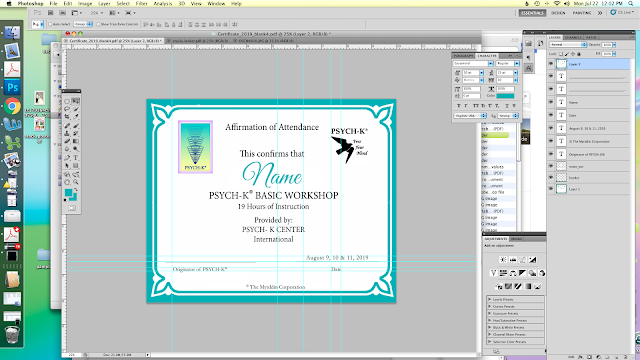

Voila! All the layers you have in the document will be flattened on one top most layer.  Layer 2 is the copy merged layer. I rarely flatten my images are layers, but if I need to send a proof I find it easier to merge up than down...which sometimes you lose effects with different types of layers. Or using the merged layer to bring into another document for a proof.


Hope this helps!


• https://www.dafontfree.io/ •
Is my favorite resource for free fonts. 


Mac > Option 8

Windows > Alt 8

• My first graphic assignment at work was labels for this homemade dog popsicle labels. After every ingredient she had one of those dots... you best believe I wasn't going to copy paste every time. •


Usually on the weekends I have time to attend the weekly portrait group and paint. Normally I don't stay the whole session Most of these are never completed or were painted in under 2 hrs.
At times I feel like painting is self flagellation. More not so good mental beatings of bad drawings but I still continue to paint! My mentor used to say portraits is the most complex and difficult subject matter compared to a landscape and such.

The last month or so my focus is bridging and fine-tuning my knowledge of Adobe programs
such as InDesign and Illustrator. Any Photoshop user to Illustrator will tell you this a nightmare.
And any AI to PS user will tell you the same. A customer even gave me her old AI book to use and reference because we had a conversation about being the polar opposite and wished me luck
in my challenge.

Unlike other Adobe suite products where most of the time the base knowledge is transferable.
AI and PS are polar opposites. the shortcuts, terms, and menu placement is different from the other. I'm ready for this challenge and I am more open minded to learn AI. years ago I took a class on it and pretty much had the attitude and arrogance of why bother learning this skill...and I got a new game console too .


These paintings were done at different points this year. With the really bad ones I just paint over it and reuse the canvas for something better.